
With the release of apples lightweight version of AR, Google has to come up with something advanced AR SDK to compete with the Apples AR core. Google tangle is quite old and it was separate device. Since people do not want any separate device for AR. Tangle device is not popular with people. Google has decided to compete with Apple AR Kit with the new release of AR core.
AR Core very different to tango since it use modern smart phones to give amazing AR experience to the modern smart phone users. According to the Clay Bavor ( Google’s head of augmented and virtual reality ), ARCore is an long term outgrowth of Tango and he also said, “Our approach with Tango was to un-constrain ourselves, That really let us learn a lot, figure out what the use cases are, and push forward the technology out ahead of what would have been possible with standard smartphone hardware.” .
What’s new in ARCore?
There are three main technologies that ARCore uses to understand the environment and merge virtual content with the real world scene through the smartphone camera. The first is motion tracking, which estimates a phone’s relative location based on internal sensors and video footage — so you can pin objects in one place and walk around them. The second is environmental understanding, which uses the camera to detect flat surfaces. Light estimation is the third technology that arcore uses, which helps virtual props cast accurate shadows and otherwise fit in with their surroundings. To get better visualize the lighting condition of the environment in the AR scene.
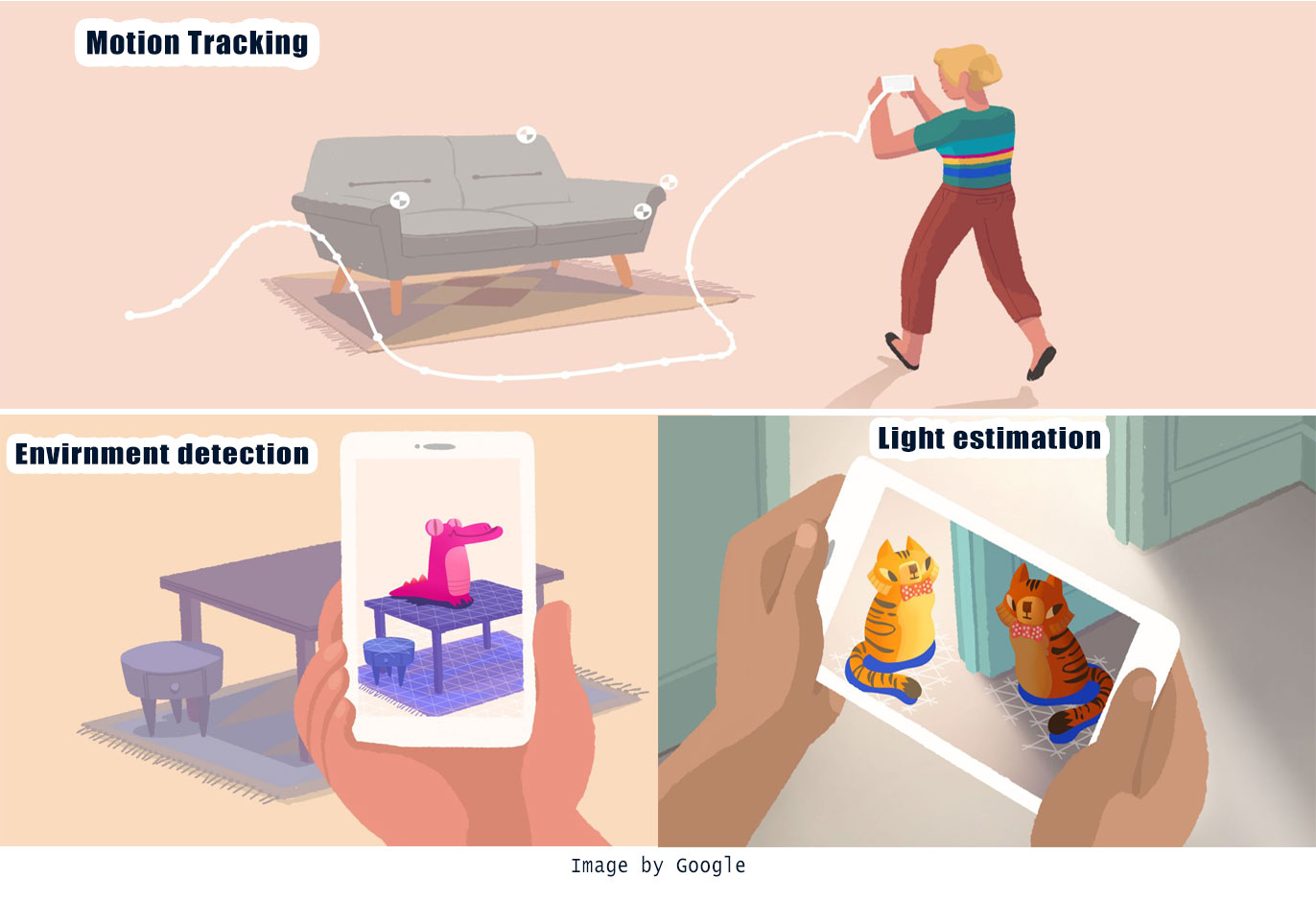
ARCore is still in preview, you can try the new AR experience with ARCore SDK. This preview AR Core will provide you the ultimate AR experience similar to tango AR in your android smart phones. But currently it only support very limited amount of phones. The key feature in AR Core lies in learning the environment. It will identify and learn the environment so it can provide ultimate AR experience based on those depth and lighting data of the environment. AR cores will use phone camera to identify the key points in the environment called features and use those points to estimate the device current world coordinates with use of other sensors as well. This tracking system allows ARCore to identify phone orientation as well as world coordinates as it moves though the space. ARCore also can detect the flat surfaces in the environment like floor or table.
Does it support my device?
After understanding the environment it will allow user to place objects or other information with the AR environment from its understanding on the environment. As you can see in the official trailer of AR core, it does dam good job understanding the environment. If you place some object in a room with ARCore then if you leave the room and come back the object you placed will be at exactly in the place you left off.
ARCore is expected to run on millions of devices in the future starting from today. But currently it’s limited to Samsung S8, Google pixel and some few other smartphones. They’re targeting about 100 million devices to run ARCore at the end of the preview. They’re working with manufacturers like Samsung, Huawei, LG, ASUS and others to make this possible with a consistent bar for quality and high performance.
This is just the beginning. Google is more focused on improving this technology.
this is just a preview version it will improved dramatically over the next few years to come and we will be able to experience like newer before will your standard mobile phones you have in your pockets. For more updates on ARCore go the Google’s developer website. Feel free to let me know your thoughts on ARCore in the comments section.